
Is a 35ppm colour photocopier the right size for your office, and which brand gives you more for your money?
Update: Canon has launched the imageFORCE C3100 Series
Canon has since introduced the imageFORCE C3100 Series as the successor to the imageRUNNER ADVANCE DX C3900 Series. Read our newer Canon imageFORCE C3135 vs Konica Minolta bizhub C361i comparison, or see the Xerox AltaLink C8200 Series. This review remains useful if you are offered a C3935i or are replacing one.
A 35 page per minute A3 colour photocopier is the most popular size for small and medium-sized businesses. It is quick enough for a busy team of 10-25 people, prints on A3 and card, and scans straight to email and the cloud. In this comparison we look at whether the Canon imageRUNNER ADVANCE DX C3935i or the Xerox AltaLink C8235 is the better buy.
Who needs a 35ppm colour photocopier?
- Small businesses where one copier serves the whole office.
- Departments in larger organisations that need their own colour device.
- Accountants, solicitors, estate agents and architects.
- Offices printing roughly 6,000-15,000 pages a month.
This is a detailed comparison of the Xerox AltaLink C8235 and the Canon imageRUNNER ADVANCE DX C3935i, one of the best-selling A3 colour multifunction printers in Europe. We compare what comes as standard, what costs extra, monthly volume, security, cloud printing and paper handling.
This review will also help you if you’re looking to buy or rent any of the following Canon office Multi-Function printers;
- Canon imageRUNNER Advanced DX C3922i
- Canon imageRUNNER Advanced DX C3926i
- Canon imageRUNNER Advanced DX C3930i
- Canon imageRUNNER Advanced DX C3935i
Or buy or rent any of the following Xerox AltaLink C8200 office Multi-Function Printers;
- Xerox AltaLink C8230
- Xerox AltaLink C8235
- Xerox AltaLink C8245
- Xerox AltaLink C8255
- Xerox AltaLink C8270
What is included as standard, and what costs extra?
Hardware
One of the biggest plusses that the Xerox AltaLink C8235 has from the outset is the amount of hardware and functionality that comes as standard. To match the basic specification of the Xerox you have to add a lot of optional extras to the Canon. Xerox also includes a huge range of software functionality, similar software is available on the Canon, but only with a paid UniFLOW subscription.
The following items are all chargeable extras on the Canon imageRUNNER Advanced DX C3935i.
Document feeder
The Xerox AltaLink C8235 comes with a 130 sheet Single Pass Document feeder, the Canon imageRUNNER Advanced DX C3935i doesn’t even come with a platen lid, it’s an optional extra. Most users won’t be happy with a platen lid, so you would then choose either the Duplex Document Feeder DADF BA1 or the Single Pass Document Feeder DADF C1 – both are extra cost optional extras.
Paper cassettes
Depending on which version you choose the Xerox AltaLink C8235 comes with either four 520 sheet paper drawers (C8235V_T) all of which accept SRA3 paper, or the high-capacity version which sees the bottom two 520 sheet drawers swapped for 2 x high capacity A4 drawers giving a total paper capacity of 3,140 sheets (C8135V_F). With either version the paper drawers act as a built-in cabinet / stand.
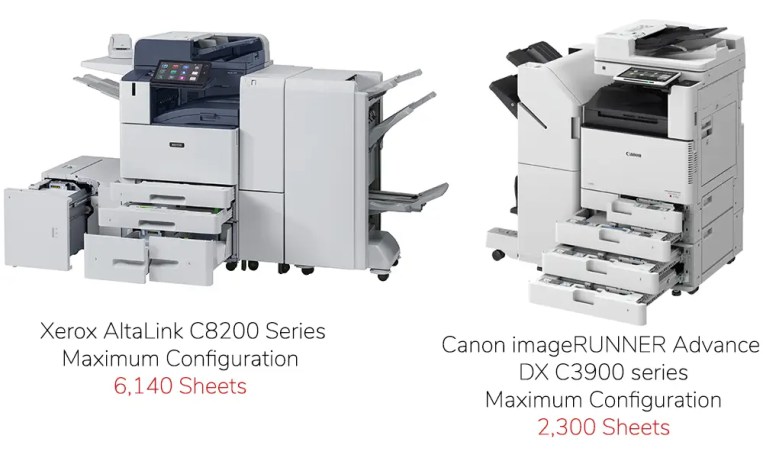
On the Canon imageRUNNER Advanced DX C3935i the buyer has to pay extra for either a basic cabinet with no cassettes or a 2 paper drawer stand / cabinet. The maximum paper capacity on the Canon tops out at 2,300 sheets, whereas the maximum on the Xerox (when equipped with the optional 3,000 sheet Hi-Capacity Feeder) is a huge 6,140 sheets.
None of the paper drawers on the Canon support SRA3, this is only possible through the bypass. The upper cassette on the Canon only supports A4. The cassettes only support a maximum of 256 GSM, anything heavier has to go through the bypass.
All four of the Xerox’s standard cassettes support SRA3 and up to 300GSM paper weight.
Output tray
There is an inner separation tray that is standard on the AltaLink. The tray can be used to separate print jobs from copy jobs, ensuring users do not inadvertently remove a colleague’s printouts. This is an extra cost item on the Canon (Inner 2way tray – M1).
How many pages a month can each copier handle?
The recommended average monthly print volume on the Canon is only 7,000 pages, less than half the recommended volume of the AltaLink C8235 at 15,000 pages.
Here is how a 35ppm colour photocopier fits against other office sizes:
| Monthly print volume | Typical office | What you need |
|---|---|---|
| Up to 3,000 pages | 3-10 people, occasional colour | 20-25ppm entry A3 colour MFP (e.g. VersaLink C7120 / C7125) |
| 3,000-6,000 pages | 5-15 people, one shared device | 25-30ppm A3 colour MFP (e.g. VersaLink C7130, AltaLink C8230) |
| 6,000-12,000 pages | 10-25 people, small business or department | 30-36ppm A3 colour MFP (e.g. AltaLink C8235, bizhub C361i) |
| 12,000-25,000 pages | 20-50 people, busy office or department | 45-60ppm A3 colour MFP (e.g. AltaLink C8245 / C8255, bizhub C451i-C651i) |
| 25,000-50,000+ pages | 50+ people, whole-floor or print room | 65-70ppm heavy-duty A3 colour MFP (e.g. AltaLink C8270, bizhub C751i) |
Software, apps and cloud printing
Apps
The Xerox AltaLink C8235 comes with quite a lot of cloud software integrations and apps out of the box that are included as standard. Whilst some of the apps are totally free, some are credit based and these will expire at some point. You can buy more credits without committing to a subscription. Xerox has a customer facing portal where end users can purchase credits or apps directly.
Canon does have some cloud services integrations and apps, but most of these will require you to first of all commit to a subscription to their Uniflow Software, in order to get access to the integrations. Canon does not have a customer facing portal to purchase services or Apps. The customer must go through Canon or their supplying agent.
Xerox has an open software platform; partners can create apps for customers according to a customer’s specific needs. Canon does not offer an app building or customisation service.
Cloud printing and integration
Xerox are named a Leader in Quocirca’s Cloud Print Services 2024 Landscape Report. Xerox have taken a big step in the direction of cloud printing and have deeply integrated the AltaLink with Microsoft’s Universal Print offering, meaning that you do not need to use Microsoft’s Universal Print Connecter. You will need to use the Microsoft Universal Print “Connecter” to use the Canon with Universal Print.
The Xerox AltaLink also has full Cloud Identity Provider (IdP) Integration, including Active Directory, Ping Identity, Okta. Canon has no Cloud IdP.
With the Xerox AltaLink you can print from Dropbox / 365 / OneDrive / Box / Google Drive cloud print services. To get access to these services with Canon you will first need a paid subscription to UniFLOW.
Print security
Xerox has been named a Leader in Quocirca’s Global Print Security Landscape 2024 Report. Read the Security report here
Xerox is one of the only Printer Manufacturers offering Single Sign On (SSO Oauth2). This means that with a single sign on to an AltaLink device you will be authenticated for multiple cloud services, saving you valuable time from having to log in to multiple online accounts.
The Canon imageRUNNER Advanced DX C3935i does not have SSO.
The Xerox AltaLink has more security certifications and integrations than any other print device available. A detailed analysis can be found in the security section further below.
A full datasheet of Xerox’s Security Certifications 2024 can be downloaded HERE
Xerox AltaLink C8235 vs Canon imageRUNNER ADVANCE DX C3935i: key specifications
| Features | AltaLink C8235V_T | Canon imageRUNNER Advanced DX C3935i |
|---|---|---|
| Model launch date | Aug-24 | May-23 |
| Speed – pages per minute A4 Colour | 35 | 35 |
| Speed – pages per minute A4 Mono | 35 | 35 |
| Recommended Average Monthly Print Volume (AMPV) Pages | 15,000 | 7,000 |
| First Print out time Colour (seconds) | 5.7 | 7.4 |
| First Print out time Black (seconds) | 4.2 | 5.5 |
| Print Resolution (D.P.I.) | 1,200 x 2,400 full speed | 1,200 x 600 or 1,200 x 1,200 (1/2 speed) |
| Inner output tray capacity (sheets) | 250 / 250 | 250 Standard / 500 with Optional Tray M1 |
| External face up Catch Tray capacity (sheets) | 100 | Optional with Copy Tray-T2 100 Sheets |
The Canon imageRUNNER Advanced DX C3935i and Xerox AltaLink C8235 are closely matched when it comes to the basic specifications, so you could be forgiven if the machines appear to be equal competitors. The stand-out mismatch in the above section is the comparatively low monthly volume capability of the Canon.
Touchscreen and access control
| Screen & Access Features | AltaLink C8235V_T | Canon imageRUNNER Advanced DX C3935i |
|---|---|---|
| Screen Size (inches) Tilting or Fixed | 10.1 / Tilting | 10.1 / Tilting |
| Personalised layout for each user when logged on | Yes | Yes |
| Feature Customisation | Yes | No |
| Ability to lock features to unauthorised users | Yes | Requires Paid subscription to UniFLOW |
| Ability to create one touch workflows | Yes | Yes |
| External Keyboard | Optional | No |
| NFC Mobile unlock – Tap to Pair | Standard | Requires Paid subscription to UniFLOW |
| Login with PIN | Standard | Requires Paid subscription to UniFLOW |
| Login with Mobile App | Standard | Requires Paid subscription to UniFLOW |
| RFID Card Reader | Integrated (Optional) | Integrated (Optional) |
| Single Sign On SSO to Cloud Services – Oauth2 | Yes | No |
| Cloud idp Integration | Okta, Ping, Microsoft Azure | No |
| Full integration to LDAP | Yes | Yes |
| Access Cloud repositories for printing | Dropbox / 365 / OneDrive / Box / Google Drive | Requires subscription to UniFLOW |
The Xerox AltaLink C8235 and Canon imageRUNNER Advanced DX C3935i start out on an even footing, both have a tilting 10.1 inch screen. The Xerox pulls away thereafter with a much higher level of customisation and productivity features built in.

Apps and AI features
| Apps & Ai Features | AltaLink C8235V_T | Canon imageRUNNER Advanced DX C3935i |
|---|---|---|
| AI-Assisted Adaptive Learning | Yes | No |
| Free to download Apps | Yes | No |
| Pre-installed AI-Assisted Apps | Yes | No |
| Customer facing app portal | Yes | No |
| Ability for app creation | Yes | No |
There’s no contest here, the Canon imageRUNNER Advanced DX C3935i seems like such a dated model with limited functionality. The Xerox AltaLink C8200 Series, with its built in ai, shows what one year of progress in the world of technology brings.
Printing features and cloud print services
| Printing Features | AltaLink C8235V_T | Canon imageRUNNER Advanced DX C3935i |
|---|---|---|
| Application defaults configurable (e.g. print emails in mono) | Fully Customisable | Not specified |
| Rules Based Printing | Yes | |
| Configurable user permissions (user, group, time & date, Colour or Mono) | Yes | Requires chargeable Uniflow subscription |
| Microsoft Universal Print Support | AltaLink device is registered with Microsoft Universal Print and eliminates the need for the Universal Print Connector | Yes, but Canon still needs to use the Microsoft Connector |
| Apple AirPrint | Yes | Yes |
| Mobile Printing | Standard & Included at no extra cost | Requires Chargeable UniFLOW subscription |
| Printing from 3rd party Cloud services | Dropbox / 365 / OneDrive / Box / Google Drive | Requires chargeable subscription to UniFLOW – |
Both the Xerox AltaLink C8200 Series and the Canon imageRUNNER ADVANCE DX C3900 Series do the traditional basics really well. When it comes to modern methods of printing and accessing cloud services Xerox have chosen to include what users are asking for, out of the box and free of charge. Canon offers advanced cloud services, but most are only available with a paid for subscription to UniFLOW.
Scanning features and cloud scanning
| Scanning Features | AltaLink C8235V_T | Canon imageRUNNER Advanced DX C3935i |
|---|---|---|
| Platen Lid | Single Pass Document Feeder as standard | Optional Platen Lid Y3 |
| Duplexing Document Feeder | Single Pass Document Feeder as standard | Optional DADF BA-1 |
| Single Pass Scanning Document Feeder | Standard | Optional DADF C-1 |
| Document Feeder capacity (sheets) | 130 | DADF-BA1 (100) / DADF-C1 (200) |
| Document Feeder Speed Colour (single sided images per minute) | 82 | Not stated |
| Document Feeder Speed Mono (single sided images per minute) | 141 | DADF-BA1 (70) / DADF-C1 (135) |
| Maximum Scanning Resolution D.P.I. | 600 x 600 | 600 x 600 |
| Simplified auto set up to Gmail, iCloud, Microsoft, Yahoo | Yes | No |
| Scan to 3rd party Cloud services | Dropbox / OneDrive / Box / 365 / Google Drive | Requires Chargeable UniFLOW subscription |
| OCR Scanning | Yes | No |
| Encrypted PDF | Yes | Yes |
| Scan Preview | Yes | Yes |
The Xerox AltaLink C8235 comes standard with a 130 sheet capacity single pass document feeder. The Canon imageRUNNER Advanced DX C3935i does not come with a document feeder or even a platen lid, the buyer must choose from the following; Platen Lid Y3, Duplexing Document Feeder BA-1 or Single Pass Document Feeder C-1. This latter C-1 option is closest to what comes as standard on the Xerox, albeit with a higher capacity of 200 sheets.
Memory, hard drive and processor
| Memory & Processor & Wi-Fi | AltaLink C8235V_T | Canon imageRUNNER Advanced DX C3935i |
|---|---|---|
| Genuine Adobe Postscript 3 | Standard | Standard |
| Hard Drive Capacity | 256GB | 256GB SSD |
| Hard Drive Type | NVMe SSD | SATA SSD |
| Encrypted Hard Drive | AES 256 FIPS 140-3 | AES 256 FIPS 140-2 (140-3 waiting approval) |
| Hard Drive Option | 1TB NVMe SSD | 1TB SATA SSD |
| Processor | Intel Atom® Quad Core 1.91 GHz | 1.6 GHz Dual Core |
| RAM Memory | 4GB | 3.5GB |
| Wireless Option | Dual Band Wireless Kit Can use LAN & Wi-Fi Direct Concurrent | Wi-Fi or LAN not Concurrent |
| Wi-Fi Direct without connection to LAN | Yes | No |
The headline specifications are evenly matched, however when you dig deeper, the Xerox is once again just a little more highly specified than the Canon. Whilst the hard drive capacities are the same, Xerox uses the latest NV RAM chip, which is up to 5 times faster than an SSD Drive. Xerox use a newer and more powerful Intel Branded chip, along with a slightly larger RAM.
Paper capacity and paper handling
| Paper Capacities | AltaLink C8235V_T | Canon imageRUNNER Advanced DX C3935i |
|---|---|---|
| Tray 1 (Max Sheets / Max Size / Max Weight) | 520 / SRA3 / 300gsm | 550 / A4 / 256 |
| Tray 2 (Max Sheets / Max Size / Max Weight) | 520 / SRA3 / 300gsm | 550 / A3 / 256 |
| Tray 3 (Max Sheets / Max Size / Max Weight) | 520 / SRA3 / 300gsm | Optional Must choose either Plain Pedestal S3 Or Feeding Unit-AW1 2 x 550 Sheets |
| Tray 4 (Max Sheets / Max Size / Max Weight) | 520 / SRA3 / 300gsm | |
| Tray 5 (Max Sheets / Max Size / Max Weight) | Optional 3,000 Sheets A4 – side feeder | N/A |
| Maximum possible paper capacity including bypass (sheets) | 5,180 | 3,450 |
| Maximum Paper Weight single sided through cassettes (gsm) | 300 | 256 |
| Maximum Paper Weight duplex (gsm) | 300 | 220 |
| Bypass capacity (sheets) | 100 | 100 |
| Bypass Maximum Size / Weight | SRA3 / 300GSM + Banners | SRA3 / 300GSM |
| Banner Feeding | Optional Long sheets/banners 320mm x 1,320mm 106 – 220 gsm | No |
The Xerox AltaLink leaves the Canon ImageRUNNER severely wanting in the paper capacity department.
The Xerox AltaLink C8235 comes as standard with four drawers, giving a total capacity of 2,180 sheets. All paper trays handle 300GSM and SRA3 size paper. The C8235V_F version has 3,140 sheets as standard. The AltaLink C8200 Series can be supplemented with an optional 3,000 sheet hi-capacity paper deck too.
The Canon cannot compete, with just two 550 sheet paper drawers as standard. The maximum paper weight in all drawers is 256GSM. The top tray (tray 1) only accepts A4, the second tray holds up to A3. You can only print on heavier stocks and SRA3 through the bypass. You will have to specify and pay extra for a cabinet, or additional paper trays.
The Xerox AltaLink will duplex on to 300GSM SRA3, the Canon can only duplex on A3 up to 220GSM

Size and weight
| Weight & Dimensions | AltaLink C8235V_T | Canon imageRUNNER Advanced DX C3935i |
|---|---|---|
| Width with 4 cassettes | 620MM | 565MM |
| Depth with 4 cassettes | 723MM | 722MM |
| Height with 4 cassettes | 1,130MM | 1,145MM |
| Weight KG | 143 (including standard 4 cassettes) | 98kg with 2 x 550 cassette feeding unit AW1 |
If you’re very restricted on space, the Canon might be a better choice, it is 55MM narrower. A little bit of a giveaway as to why the Xerox has a higher duty capacity is the fact that the Xerox AltaLink C8235 weighs in at 45KG’s heavier than the Canon imageRunner Advanced DX C3935i.
Security and access control compared
| Security & Access Control | AltaLink C8235V_T | Canon imageRUNNER Advanced DX C3935i |
|---|---|---|
| Audit Log | Document / User / Function | Not specified |
| FIPS 140-3 Enhanced Encrypted Security | 140-3 | 140-2 |
| TPM module (v2.0) compliant with ISO/IEC 11889 | 2.0 | 2.0 |
| RFID Card Reader port | Optional | Optional |
| NFC (Tap to Pair) | Standard | No |
| Trellix McAfee® Embedded Control (whitelisting) | Standard | Standard |
| Trellix McAfee® Integrity Control | Optional | No |
| Transport Layer Security TLS | 1.3 | 1.3 |
| Common Criteria (ISO/IEC 15408) | Full System | Yes |
| Cisco® Identity Services Engine (ISE)Integration | Optional | No |
| Fleet Orchestrator | Yes | No |
| SIEM Support | Yes | Yes |
| Clone Capability for Enterprise wide cloned device roll out | Yes | No |
| Preset security templates | Yes | No |
Xerox has long since been a leader when it comes to the breadth and depth of its security offering, the comparison here shows that the Xerox AltaLink C8235 stands head and shoulders above the Canon imageRUNNER Advanced DX C3935i, there’s just so much that Xerox have built in as standard.
Toner capacity and consumables life
| Supplies | AltaLink C8235V_T | Canon imageRUNNER Advanced DX C3935i |
|---|---|---|
| Black Toner Capacity – A4 Pages | 59,000 | 38,500 – C-EXV 64 |
| Cyan Toner Capacity – A4 Pages | 28,000 | 25,500 |
| Magenta Toner Capacity – A4 Pages | 28,000 | 25,500 |
| Yellow Toner Capacity – A4 Pages | 28,000 | 25,500 |
| Drum Life – pages | 180,000 | |
| Transfer Belt Cleaner – page life | 160,000 | |
| Second Bias Transfer Roll – page life | 200,000 | |
| Waste Toner Container | 69,000 | |
| Fuser |
Toner capacities may not be the top of users considerations when it comes to choosing an office duty Multi-Function Printer, however it does mean that you’ll be changing toners slightly less frequently with a Xerox AltaLink C8200 Series.
Energy use and environmental credentials
| Environmental | AltaLink C8235V_T | Canon imageRUNNER Advanced DX C3935i |
|---|---|---|
| Warm up time (Cold) Seconds | 8.5 | 10 Seconds |
| Warm up time (Standby) Seconds | 4.5 | 4 Seconds |
| Proximity Sensor for auto wake up | Yes | No |
| Energy Star | Yes | Yes |
| EPEAT Gold | Yes | US Only |
| Blue Angel | Yes | Yes |
| Power Consumption (TEC) kWh/Week | 0.38 | 0.3 |
| Cisco EnergyWise® | Yes | No |
| Noise Level operational db | 63.7 | 60 |
| Noise Level Standby db | 40 | 46 |
Protecting the environment is something we must all as corporates and individuals take seriously. Both Canon and Xerox have made massive strides in recent years to help us reduce our carbon footprints. There’s little to choose between them, the Canon imageRUNNER Advanced DX C3935i does have a slightly lower TEC.
Optional extras
| Paper Feeding | AltaLink C8235V_T | Canon imageRUNNER Advanced DX C3935i |
|---|---|---|
| Cabinet / Stand / Pedestal | Standard | Optional Pedestal S3 |
| Additional 2 x Paper Cassettes | Standard | Optional AW1 |
| Additional Tandem tray module (total 3,040 sheets) | N/A | Optional AW1 |
| High Capacity Feeder | Optional 3,000 Sheet Feeder | No |
| Envelope Tray | Optional | No |
| Long Sheet Feeding (Banner Printing) | Optional | No |
| Paper Tray Lock Kit | Optional | No |
| Finishing | AltaLink C8235V_T | Canon imageRUNNER Advanced DX C3935i |
| Convenience Stapler (requires Work Surface) | Optional | Optional – B1 |
| Work Surface / Utility Tray | Optional | Optional – B1 |
| Centre tray | Standard | Optional – M1 |
| Staple less finisher | No | Optional |
| Internal Finisher | Optional | Inner Finisher L1 |
| Office Finisher – Light Duty | Optional | No |
| Booklet Maker add on for Office Finisher | Optional | No |
| 2 / 4 hole Punch for Office Finisher | Optional | No |
| Business Ready Finisher – Heavy Duty | Optional | Optional |
| Business Ready Finisher & Booklet Maker | Optional | Optional |
| Swedish 4 Hole Punch for BR Finisher | Optional | Optional |
| C/Z Folder for BR Finisher | Optional | No |
| Miscellaneous | AltaLink C8235V_T | Canon imageRUNNER Advanced DX C3935i |
| Wireless and Bluetooth Connectivity Kit | Optional | Optional |
| 1TB Hard Disk | Optional | Optional |
| Tray Lock Kit | Optional | No |
| External Keyboard Kit | Optional | No |
| Trellix Integrity Control | Optional | No |
| Fax Kit | Optional | No |
Canon and Xerox have a vast selection of accessories. In our experience, users rarely buy any of these 🤷🏻♂️.
Fiery print controller options
| Fiery Options | AltaLink C8235V_T | Canon imageRUNNER Advanced DX C3935i |
|---|---|---|
| EFI Fiery Network Server | Optional | No |
| EFI Productivity Package | Optional | No |
| EFI Ethernet Hub Kit | Optional | No |
| EFI Colour Profiler Suite | Optional | No |
| EFI Spot On | Optional | No |
| EFI Integrated Hot Folder & Virtual Printer | Optional | No |
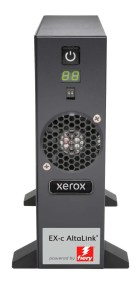
If you are looking to produce any marketing material, presentations or promotional material and you need a high quality accurate colour finish, there really is only one choice. Not only does the Xerox AltaLink C8200 Series have a higher D.P.I. (dots per inch) resolution than the Canon imageRunner Advanced DX C3935i, the Xerox can be fitted with a Fiery Controller. For the uninitiated, a Fiery is best described as a print driver on steroids. It’s not only going to get you highly accurate colour matching, it can handle those large complex files with ease.
Combine the Xerox’s premium print quality with the fact that it can duplex SRA3, means that you can produce your own in-house marketing material and get that all important full edge to edge colour, just like a professional print shop. In fact many professional print shops use a Xerox AltaLink for this very reason.
Verdict: which 35ppm colour photocopier should you choose?
Chassis
What struck us most when comparing the Canon ImageRUNNER ADVANCE DX C3935 to the Xerox AltaLink C8235 is that the Canon is clearly an entry level A3 that has been speeded up to make it appear to be a mid volume machine. The Canon C3900 series starts at 22 pages per minute and ends at 35 pages per minute. The Xerox AltaLink C8200 Series starts with the C8230 at 30 Pages per minute and tops out at 70 Pages per minute with the C8270.
The Canon has a much narrower footprint of W 565MM versus the Xerox at 620MM. They are almost identical in depth. This is indicative of an entry level machine that was never designed to support SRA3. The Canon imageRUNNER ADVANCE DX C3900 even has a smaller chassis than the entry level Xerox VersaLink C7100 Series (590MM). The light duty nature of the chassis and components also shows up in the weight of the Canon, it comes in at 98kg whereas the Xerox weighs 45% heavier, at 143kg.
The speed and chassis size makes the AltaLink C8235 feel like a true Mid / Upper volume A3 Multi-Function printer.
Monthly print capability
Layering on top of our belief that the Canon is more of an entry level machine, is the very low monthly recommended print volumes across the Canon imageRUNNER ADVANCE DX C3900 series. For example the C3935 has a recommended average monthly volume of only 7,000 prints, whereas the Xerox AltaLink C8235 can handle more than double this at 15,000 prints per month.
Software infrastructure and security
Canon makes a big deal of its UniFLOW Online software platform. What it doesn’t make a big deal of is how much of the functionality isn’t free and is dependent upon the user paying for a subscription, especially basic security features. e.g.
“uniFLOW Online is available as a Device Based Cloud Subscription for Document Output and Capture Management. Based on business needs, users can upgrade to uniFLOW Online to unlock a range of advanced benefits, including: Increased security with user authentication methods. Personalised workflows to enhance productivity. Reduced wastage by releasing jobs at the device. An intuitive cloud dashboard to leverage real-time data. Greater control over access and usage to reduce print costs.”
The AltaLink also has a greater level of security as standard, as well as a wider security toolbox, including optional Trellix integrity control and Cisco Identity Services Engine integration. Xerox’s ConnectKey open software platform gives you access to a huge range of apps, many of which are free and do not require subscription. The AltaLink C8200 series also comes preloaded with several Ai apps that dramatically improve user experience and productivity.
Colour performance and print quality
If you have any requirement for detailed or accurate colour, then there is only one choice, the Xerox AltaLink. Not only does the AltaLink have a higher print resolution than the Canon, but it also has a wider set of colour adjustments in the print driver, including “color by words”, that helps you fine tune your print output using words, e.g. make the “reds more blue”.
The Xerox AltaLink can also be equipped with a Fiery Print Controller / Server, that opens up a whole world of colour management tools. There is no option for a Fiery Print Controller / Server on the Canon imageRUNNER ADVANCE DX C3900 Series
Final thoughts
We wouldn’t say that the Canon imageRUNNER ADVANCE DX C3900 Series is a bad machine by any measure, it’s a solid all round performer. Canon’s marketing machine and their presence in the consumer market means their name is more familiar than Xerox, which is a business only brand. So, it’s no wonder, that Canon is the top selling A3 Business printer brand in Europe.
Canon brand dominance aside, in our opinion the AltaLink is a “proper” piece of kit for the serious business user or corporate looking for something that can be deployed without having to second guess it.
The Xerox AltaLink comes out of the box fully specified with no options needed, combine this with an open software platform and the best set of security credentials on the market, it’s a no brainer.
What should be included in a quote for a 35ppm colour photocopier?
Headline prices rarely compare like for like. Before you sign, ask every supplier to confirm, in writing, that the quote includes:
- The exact model and configuration, including the document feeder, paper trays and cabinet or stand.
- Security features: an encrypted hard drive, secure print release and end-of-life data wipe.
- Genuine Adobe PostScript and OCR (searchable PDF) scanning if you need them, and whether they are standard or extra.
- Any finisher, booklet maker or hole punch your team needs.
- Delivery, installation, network set-up and user training.
- A service agreement with the cost per mono and colour page, what is included (toner, parts, labour, call-outs) and the guaranteed response time.
- The contract length, any minimum monthly volume and annual price increases.
On the Canon C3935i, the document feeder (or even a platen lid), cabinet and extra paper trays are chargeable options, so check the quote includes them.
Service, uptime and support: questions to ask
Over its life, a 35ppm colour photocopier will usually cost more to run than to buy, so the service agreement matters as much as the machine. Ask:
- What is the guaranteed engineer response time, and is it measured in working hours?
- Are toner, parts, labour and call-outs all included in the cost per page?
- Is toner sent automatically when the machine reports it is low?
- Can the supplier fix problems remotely, and do they monitor the device?
- What happens at the end of the contract, and how is data wiped from the hard drive?
Should you buy, lease or rent?
Most UK businesses finance a 35ppm colour photocopier rather than paying outright. Buying gives the lowest total cost if you keep the machine for five years or more. Leasing spreads the cost over a fixed term (usually three to five years) and keeps cash free for the business. Renting suits short projects or businesses that need flexibility.
Our guide to buying, leasing or renting an office multifunction printer explains the pros and cons of each option in plain English.
Frequently asked questions
How many pages a month can a 35ppm colour photocopier handle?
It depends on the build. Xerox rates the AltaLink C8235 for 15,000 pages a month on average; Canon recommends 7,000 pages for the imageRUNNER ADVANCE DX C3935i.
Does the Canon C3935i come with a document feeder?
No. It does not include a document feeder or even a platen lid as standard. The Xerox AltaLink C8235 includes a 130-sheet single-pass document feeder.
Has the Canon imageRUNNER ADVANCE DX C3935i been replaced?
Yes. Canon has introduced the imageFORCE C3100 Series. See our imageFORCE C3135 comparison.
Which is better for colour marketing print?
The Xerox AltaLink C8235. It can duplex SRA3 on 300gsm card and can be fitted with a Fiery print controller; there is no Fiery option for the Canon C3935i.
Which is smaller?
The Canon is 55mm narrower (565mm versus 620mm), which can help in a tight space.
Do you supply Canon photocopiers?
No. Scriptum supplies and supports Xerox and Konica Minolta. We compare other brands honestly so you can make an informed choice.
Get expert advice on a 35ppm colour photocopier
Scriptum Document Solutions supplies, installs and supports Xerox and Konica Minolta multifunction printers for businesses across the UK. We will look at how your office prints, recommend the right size and configuration, and give you an honest like-for-like quote. Not sure what you need? Book a free print audit and we will measure it for you.
Browse the Xerox AltaLink C8200 Series in our online shop, or compare the AltaLink C8235 with the Konica Minolta bizhub C361i.
Call us on 0800 011 2858, email interface@scriptumds.co.uk or fill in the short form below and we will come back to you.
About the author: Grant Wassell
For several decades Grant has been a recognised industry expert and authority in the field of copying, print and technology for business users.
Grant founded Scriptum Document Solutions and is passionate about helping businesses make reliable informed decisions on their deployment of office technology, especially multi-function print devices.


